Tactiles
Positioning
Best practice guidance for the placement and arrangement of embellishments
Site setout
Park users
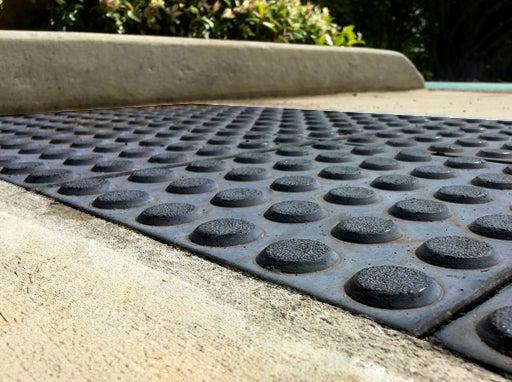
A warning alert to pause and consider where a person who is blind or has a vision impairment is approaching:
- A potential hazard
- A point where further information might be provided, such as a raised tactile and Braille sign.
Environmental information such as vehicle noise or a readily identifiable aroma such as brewing coffee can provide further clues to location.
Site specific selection
Select tactiles on the basis of site specific professional judgement, in accordance with AS 1428.4.1. (Note that AS 1428 (all parts) refer to this standard for the appropriate use of TGSI’s).
- Install a TGSI product suitable for the site prevailing light conditions.
- If the site is primarily in full shade, select a TGSI colour which is highly visible in those conditions.
- If the site is primarily in full sun, select a colour which is highly visible in those conditions.
- Select a TGSI product with attributes suitable for the site.
- Where TGSI’s are used in areas which may be subject to vehicular traffic or are in near vicinity to vehicular traffic, they should not be a ceramic type.
- At an existing location where the surface is subject to movement, where there are existing service lids with irregular finishes, or as a temporary solution, polyurethane flexible TGSI may be suitable.
- Avoid using TGSI’s where the design will include defining a radius or where they might be impacted by drainage infrastructure. Where this occurs advice should be sought from an access consultant who is an accredited member of the Association of Consultants in Access Australia (ACAA).
Orientation
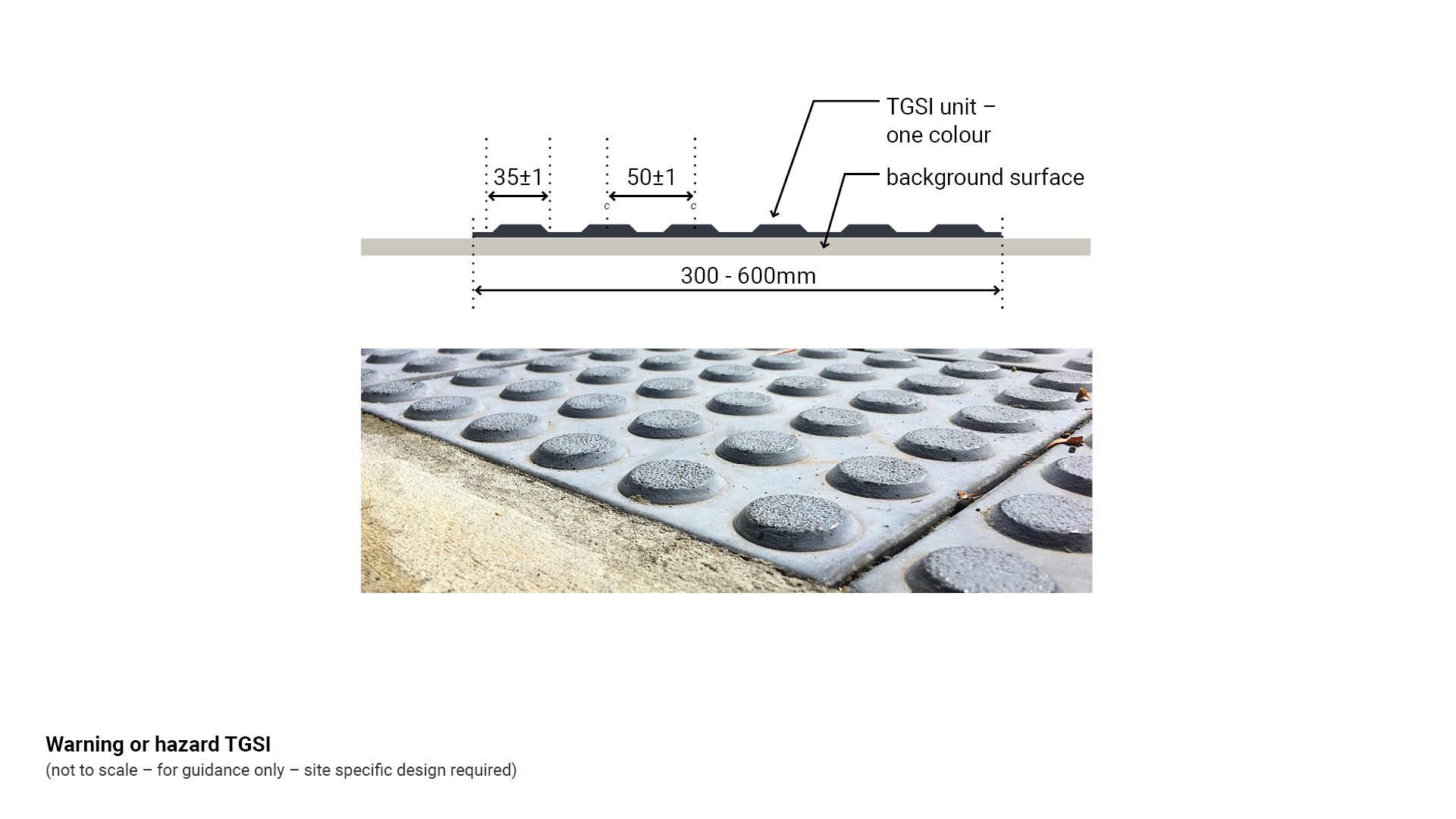
- Install warning or hazard TGSI 600 mm deep minimum, perpendicular to the direction of travel, to prevent a person with low vision from stepping over the tactiles.
- Install warning or hazard TGSI 300 mm back from a hazard to provide a safe location for a person to give thought to their next movement.
- Install warning or hazard TGSI on kerb ramps where one or more attributes of the ramp are non-compliant with AS 1428.1 Design for access and mobility or at a cut through traffic island which contains TGSI.
- Note that a fully compliant kerb ramp does not require TGSI, (except where it is opposite a pedestrian refuge which contains TGSI.)
See Figure 17: Warning or hazard TGSI.
Figure 17: Warning or hazard TGSI
Site setout - warning or hazard TGSI at ramps
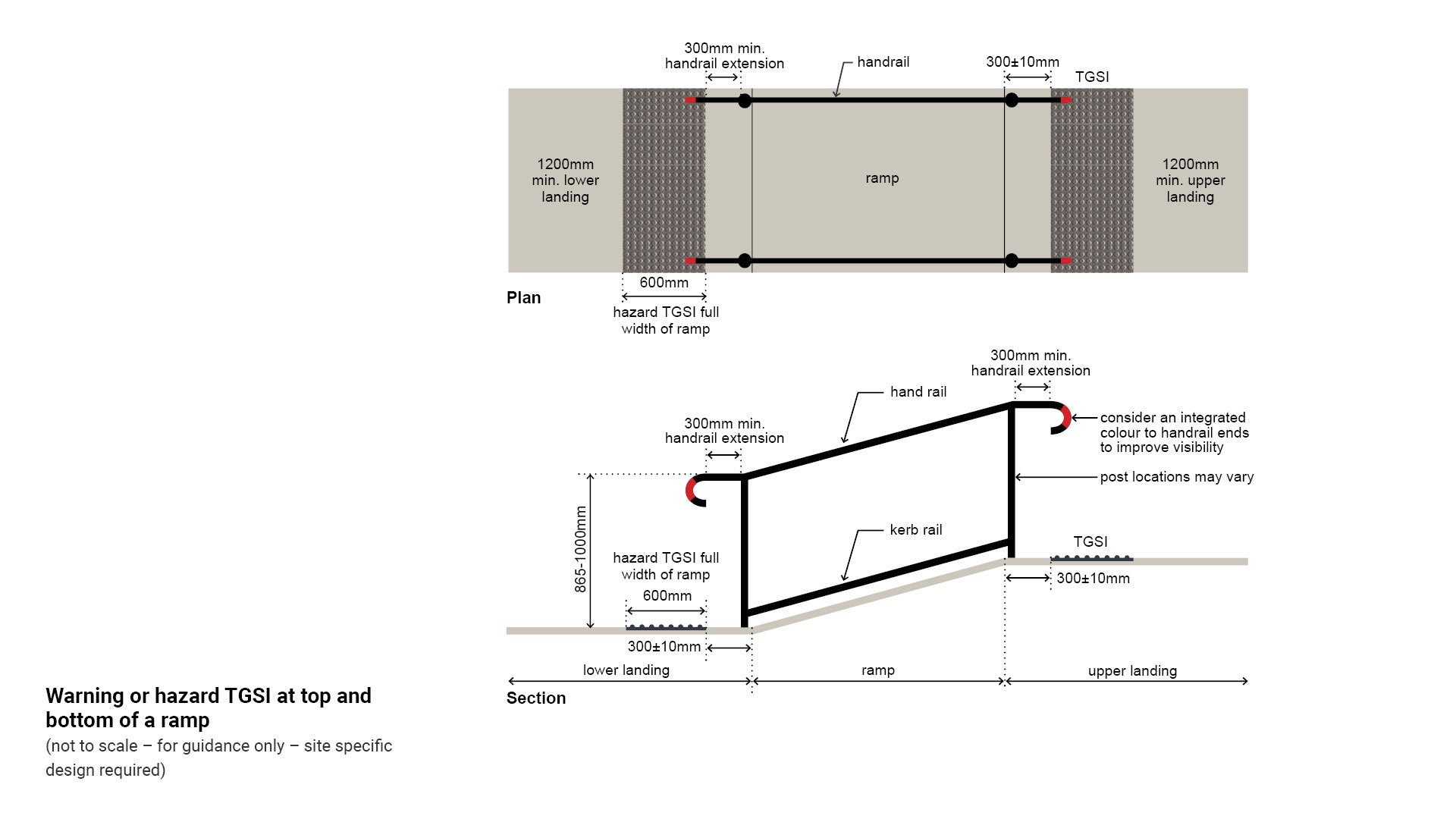
- Warning or hazard TGSI are required full width to the top and bottom of all ramps to alert VIPs about the location of the ramp start and finish.
See Figure 18: Warning or hazard TGSI at top and bottom of a ramp.
Note: Install warning or hazard TGSI to the top and bottom of ramps for a single ramp and where there are multiple ramps with continuous handrail.
Install warning or hazard TGSI to intermediate landings if there is a break in one or more handrails.
Figure 18: Warning or hazard TGSI at top and bottom of a ramp
Site setout - warning or hazard TGSI at stairs
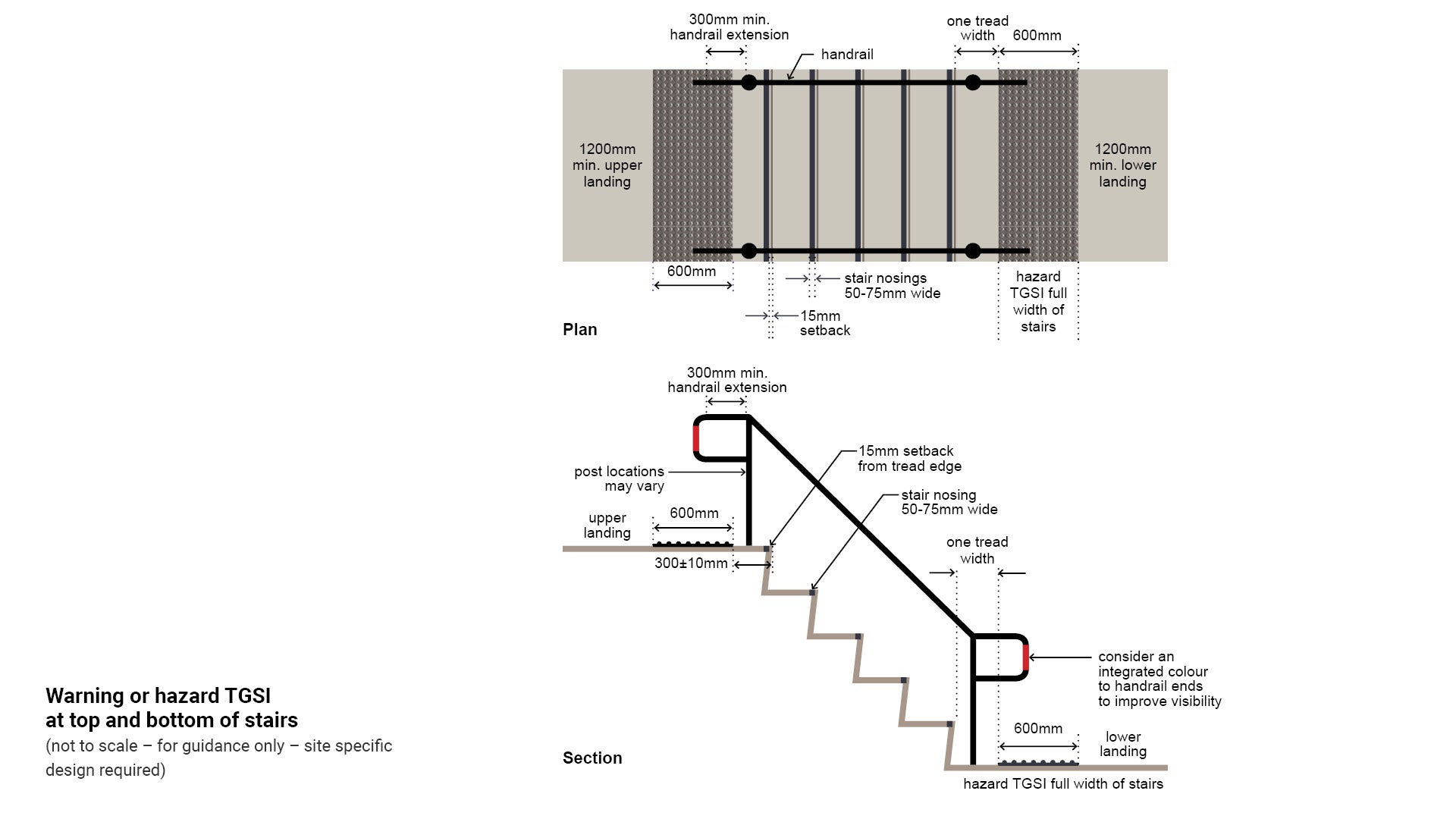
- Warning or hazard TGSI are required full width to the top and bottom of all stairs to alert VIPs about the location of the stairs start and finish.
See Figure 19: Warning or hazard TGSI at top and bottom of stairs.
Note: Install warning or hazard TGSI to the top and bottom of stairs for a single set of stairs and where there are multiple sets of stairs with continuous handrail.
Install warning or hazard TGSI to intermediate landings if there is a break in one or more handrails.
Figure 19: Warning or hazard TGSI at top and bottom of stairs
Site setout - warning or hazard TGSI at restricted circulation spaces
When a VIP is navigating within a circulation space, an overhead hazard may not be anticipated.
- Warning or hazard TGSI are required to indicate a safe path of travel when there is an overhead hazard such as a sloping wall, or an overhead sign.
See Figure 20: TGSI at an overhead hazard.
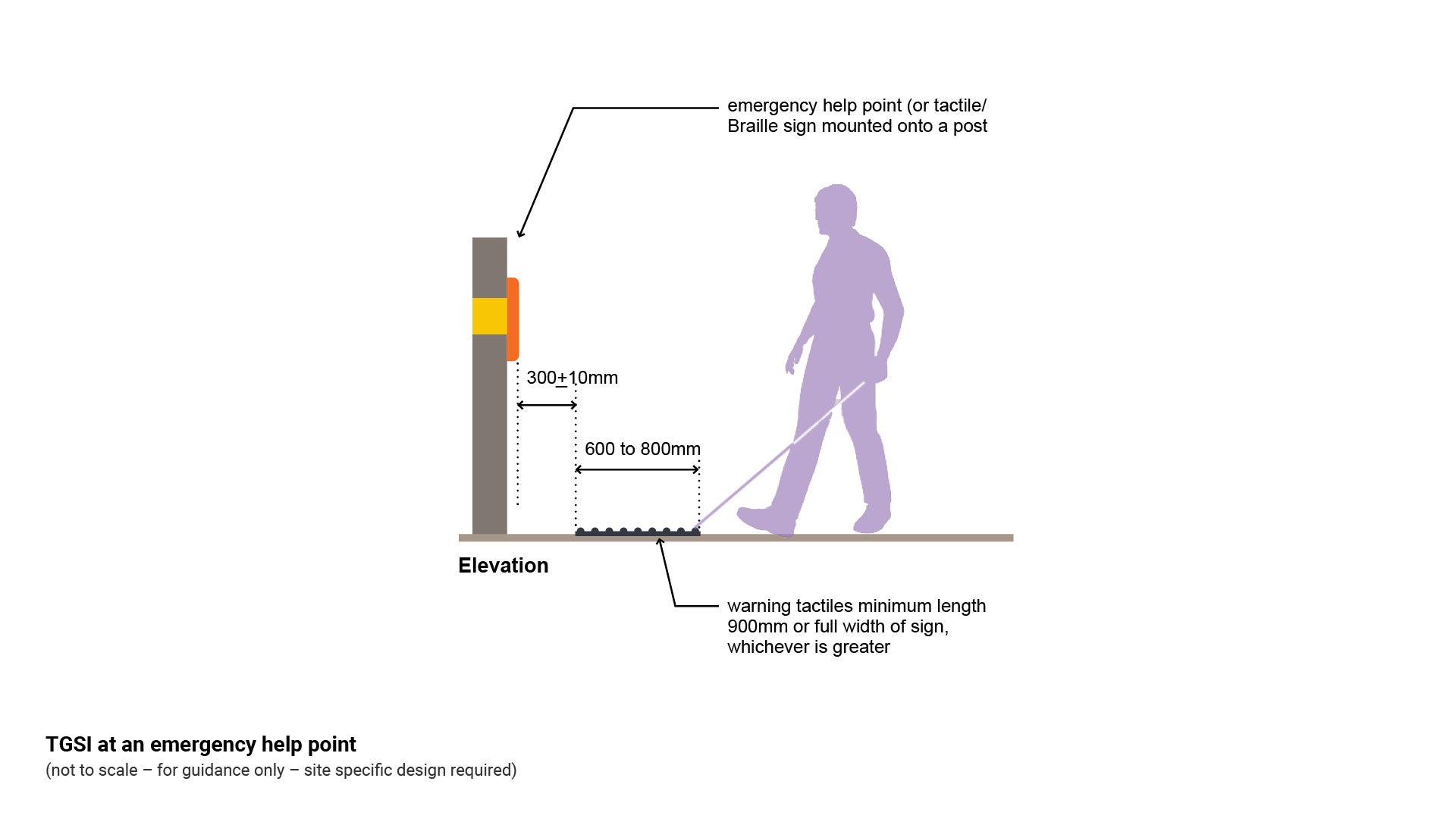
Site setout - warning or hazard TGSI at an emergency help point or information sign
Warning or hazard TGSI warn a VIP that there is a potential danger and:
- Where wayfinding information is provided within a raised tactile and Braille sign or sign face.
- Where Emergency Help Points are provided.
Install TGSI’s as follows:
- A minimum of 600 mm deep for a minimum length of 900 mm or the full width of the sign whichever is the greater.
- Set back 300 mm± 10 mm from the sign face which is to include raised tactile and Braille guidance.
See Figure 21: TGSI at an emergency help point.
Figure 20: TGSI at an overhead hazard
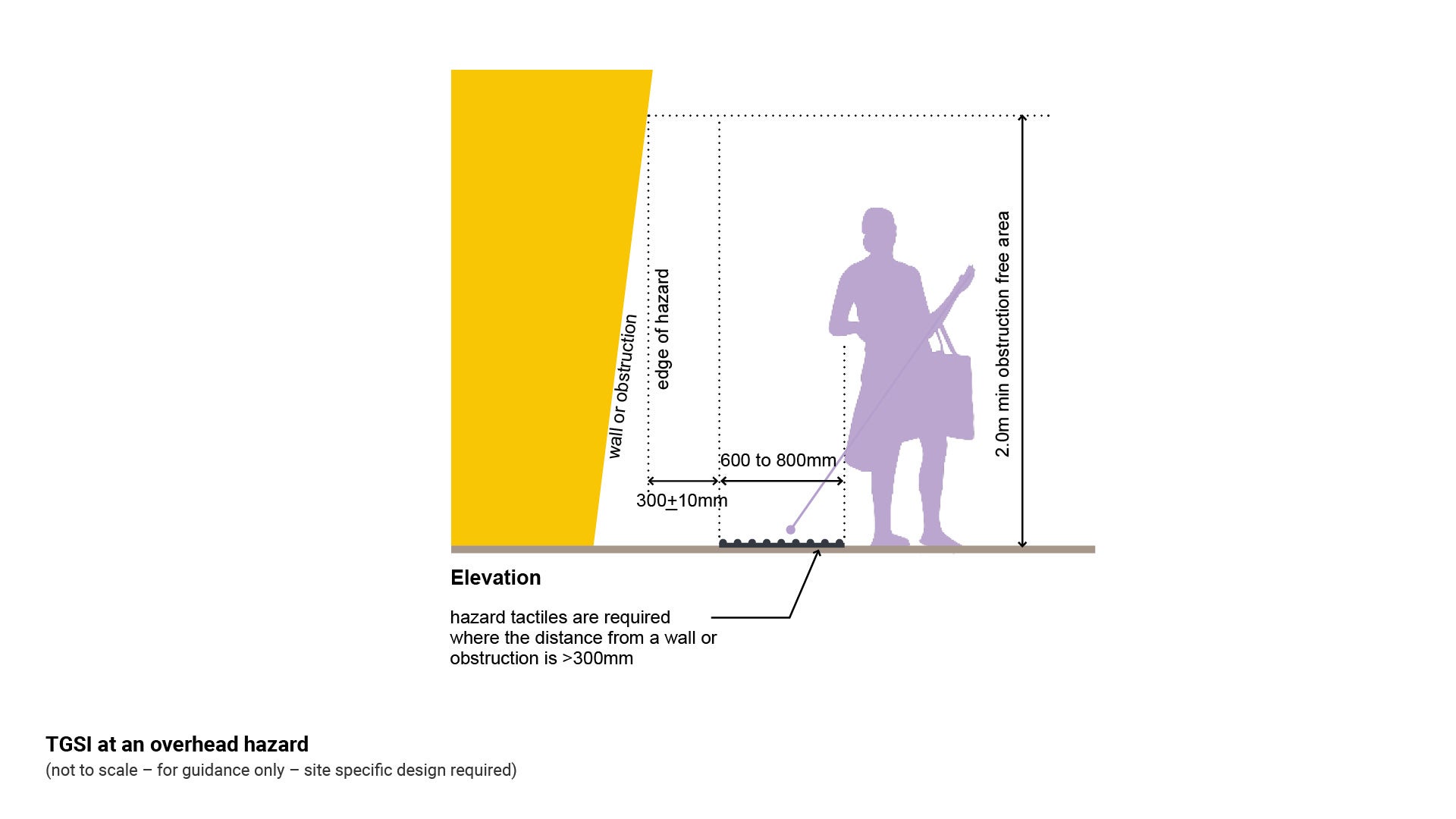
Figure 21: TGSI at an emergency help point
Site setout - warning or hazard TGSI at a non-compliant kerb ramp
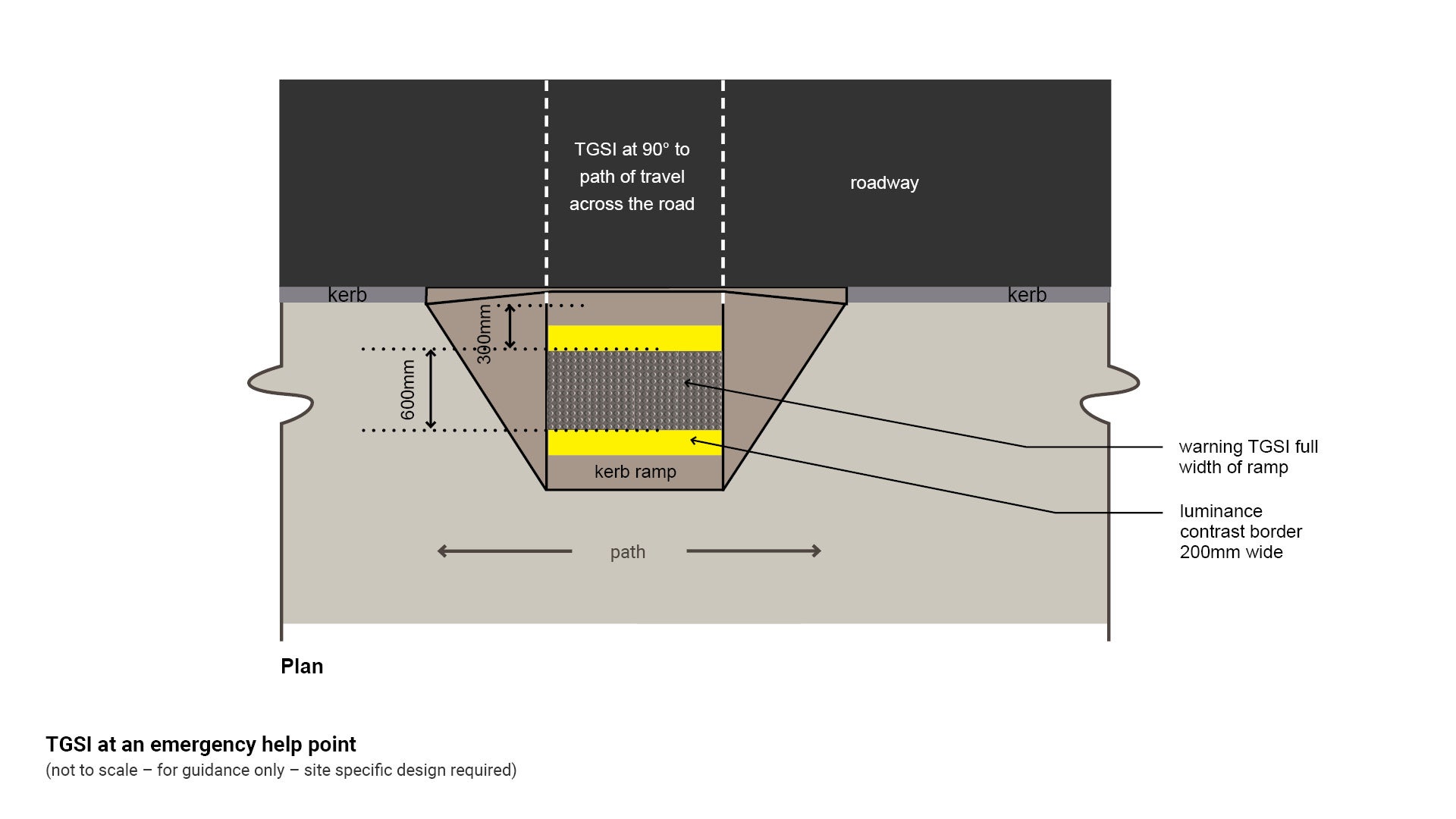
Only install warning or hazard TGSI at a kerb ramp which is non-compliant for the following:
- Where a kerb ramp is too shallow (flatter than 1:8), a VIP may not realise that they are travelling from a path into a vehicular area.
- It is preferred that non-compliant kerb ramps are replaced.
- Where an older style kerb ramp is too steep, a person who uses a wheelchair could be tipped out.
- Where a kerb ramp contains blended or smoothed edges with no tooled edge lines to provide clear path of travel advice, a person who is blind or has vision impairment may trip or fall, or diverge off the safe direction of travel. Consider replacing a non-compliant kerb ramp.
- New kerb ramps steeper than 1:8 are not permitted.
Install warning or hazard TGSI as follows:
- Warning or hazard TGSI are required full width of a non-compliant kerb ramp at 300 mm offset from the road to alert VIPs about the impending road hazard.
- Where adverse topography dictates that an existing kerb ramp is steeper than 1:8, the distance from the building line to the kerb ramp is greater than 3.0 m, and the kerb ramp has been identified as a high use site for wheelchairs or mobility devices (such as near a hospital), consider using a dual entry point crossing. The TGSI treatment is placed adjacent to the kerb ramp, and the kerb with a similar treatment on the opposite side of the road. This will assist people who use wheelchairs to move across steeper ramps, and where medical conditions may cause pain to a person using a wheelchair, as it crosses over uneven surfaces.
- Where a fully compliant kerb ramp is opposite a pedestrian refuge which contains TGSI.
- Consider the special needs of people who use wheelchairs, and who also may experience further discomfort when crossing over tactiles. Where this situation may occur (such as at a hospital or doctor’s surgery) consider installing TGSI next to a kerb ramp.
See the following for further guidance:
- AS 1428.4.1 Design for access and mobility – Figure C2E
- Figure 22: TGSI set out at a non-compliant kerb ramp.
Figure 22: TGSI set out at a non-compliant kerb ramp
TGSI set out and installation references
Install warning or hazard TGSI as per the following:
- Institute of Public Works Engineering Australia (IPWEA) standard drawings:
- RS-090 Ramped Pedestrian Crossings
- RS-091 Ramped and cut through treatments
- RS-092 Installation of TGSI’s on ramped kerb crossings.
- RS-093 Installation of TGSI’s on ramped kerb crossings application examples.
Other references:
- Queensland Department of Transport and Main Roads (DTMR) standard drawings for TGSI ramp installation:
- SD-1446 – Kerb ramp – Ramped kerb crossing.
- SD-1447 – Median and island crossing – Ramped and cut-through treatment for pedestrian facilities.
- Queensland Department of Transport and Main Roads (DTMR) standard drawings. Reference these for DTMR controlled roads only.
- KRG1 Kerb ramp – Guidelines for the installation of TGSI’s on ramped kerb crossings
- KRG2 Kerb ramp – Application examples for the installation of tactile ground surface indicators on ramped kerb crossings.
Site setout - directional TGSI
It is important that directional TGSI are not installed where sufficient tactile cues exist. These cues can be used by people who are blind or vision impaired for wayfinding information.
Consult an access consultant accredited by Association of Consultants in Access Australia Inc. (ACAA) for site specific advice.
Position directional tactile ground surface indicators (TGSI) to provide the following:
- Install directional TGSI installations in open spaces where there are insufficient environmental cues for a VIP to way find a direction of safe travel through a space or to an object or service.
- At sites where the distance from a hazard (such as a road) to a building, is greater than 3.0 m, install directional TGSI (when there is an absence of other clues).
- Where the path is on the same level as a road (such as at shared zones), consider pedestrian desire lines and install directional TGSI at a location such as from a building entry or the building property line to a safe road crossing opportunity.
- In open spaces where there are no other tactile clues, a person with vision impairment may have difficulty walking a straight line beyond 3.0 m.
- Directional TGSI are to be installed parallel with and along the centre line of the direction of travel at 300-400 mm wide.
- A VIP who uses a white cane can use the directional TGSI for guidance by moving the cane along the depressions in the long length of the tactile unit. This aids the VIP to orient where they are going.
- Install directional TGSI at 600-800 mm wide where the TGSI are perpendicular to the path of travel, to ensure that a VIP cannot step directly over the TGSI.
- Average adult (able bodied) walking step distance is 670 mm to 762 mm measured leading heel to trailing toe. A legally blind person’s step is much shorter.
See the following figures for further guidance:
- Figure 23: Typical directional TGSI
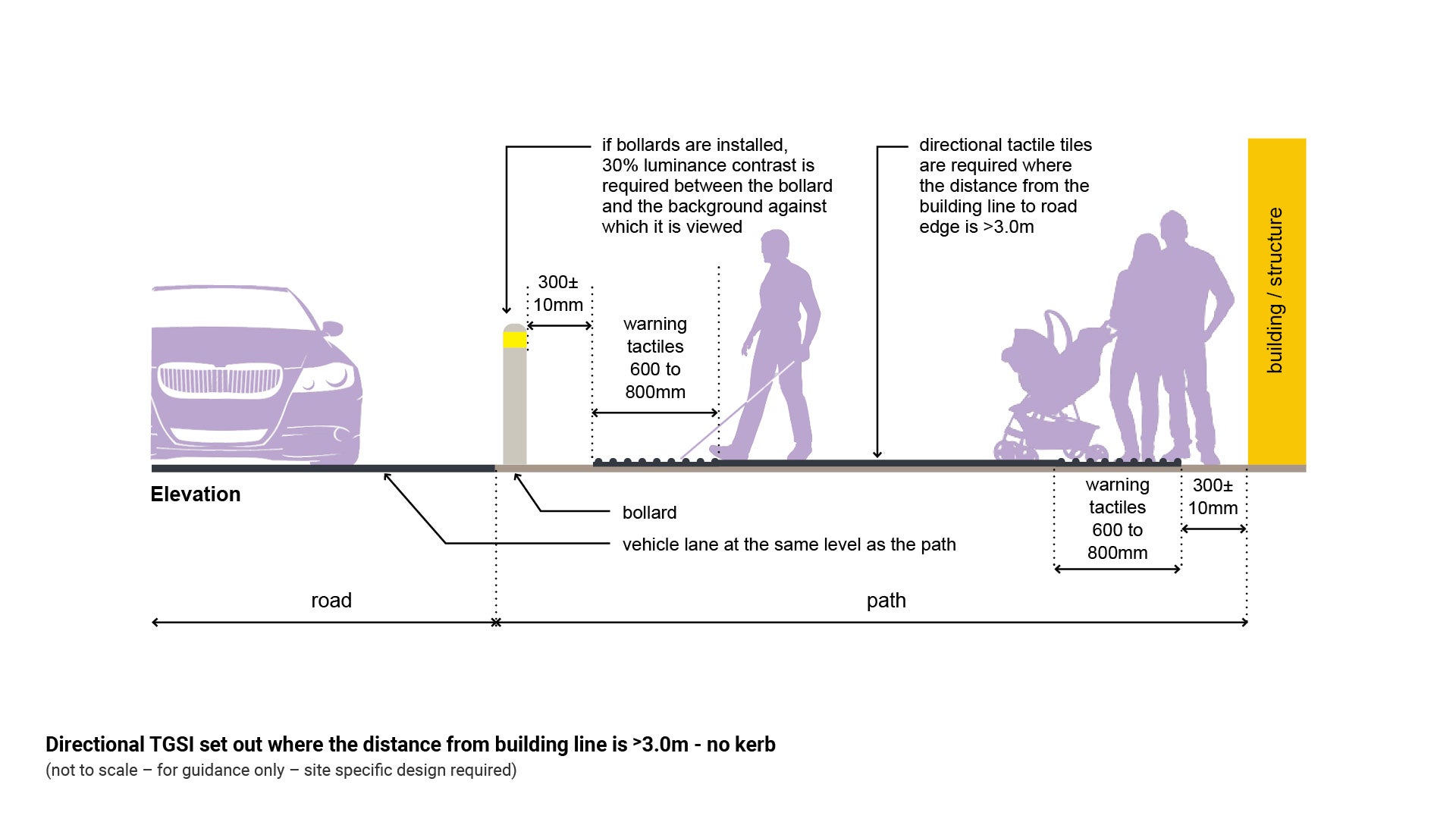
- Figure 24: Directional TGSI set out where the distance from building line is ˃3.0 m.
Figure 23: Typical directional TGSI
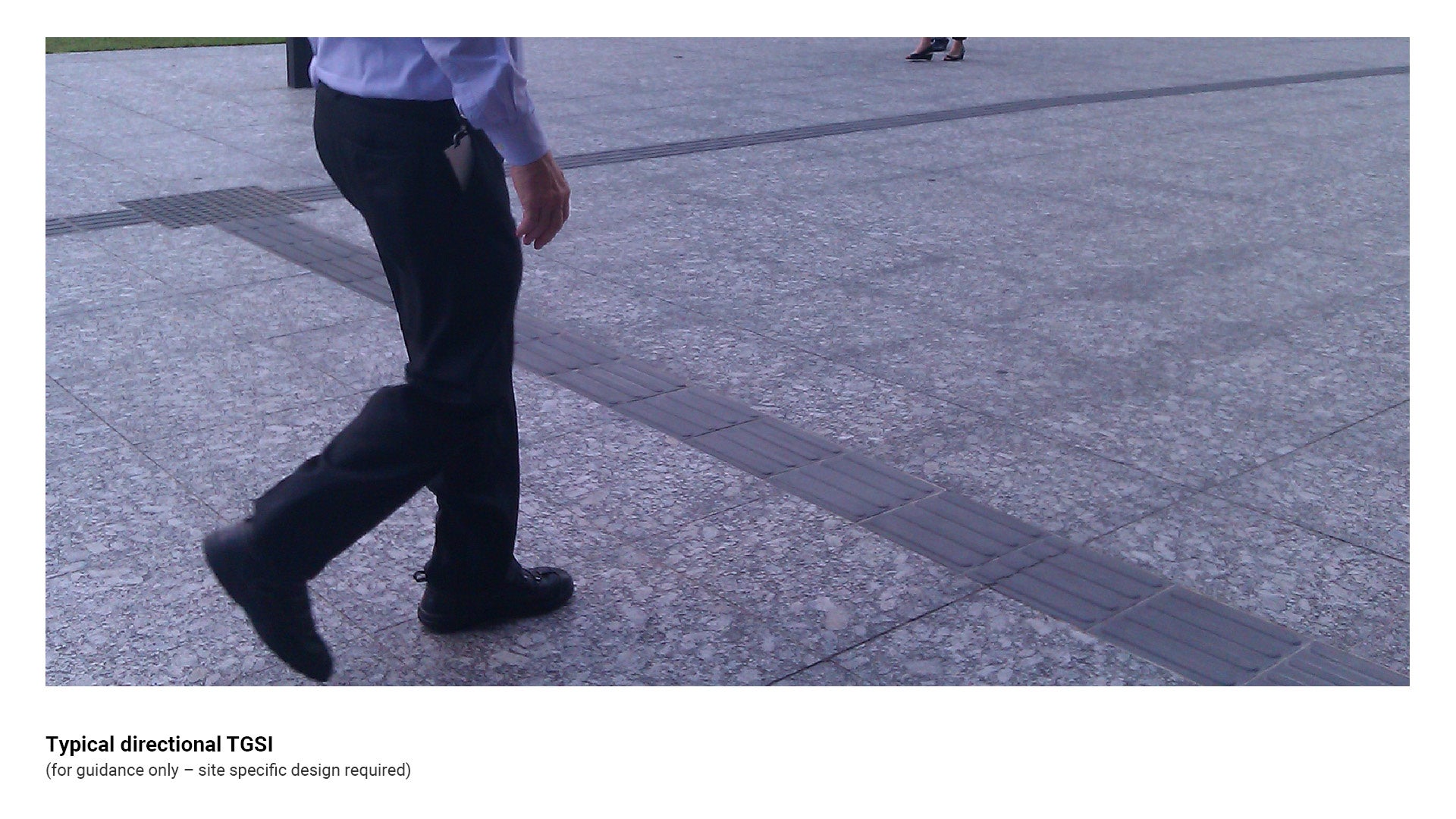
Figure 24: Directional TGSI set out where the distance from building line is ˃3.0 m
Clearances
Table 4: Positioning guidance offsets
Embellishment | Distance from | Minimum distance | Reason |
Hazard (warning) TGSI | Road edge (horizontal) | 300 mm | Provides a safe location for a VIP to stand before moving onto a road. |
Hazard (warning) TGSI | Bollard (horizontal) | 300 mm | Alerts a VIP to the presence of the bollard (hazard). |
Hazard (warning) TGSI | Any hazard (horizontal) | 300 mm | Alerts the VIP that there is a potential hazard. |
Hazard (warning) TGSI | Front to back edge of TGSI band | 600 mm | Prevents a VIP from stepping directly over a band of warning TGSI. Average adult (able bodied) walking step distance is 670mm to 762mm measured leading heel to trailing toe. A person who is blind has a much shorter step distance. |
Hazard (warning) TGSI | Any hazard (overhead) | 2.0 m | Alerts the VIP that there is a potential hazard beyond the TGSI band. |
Hazard (warning) TGSI | Any building line | 300±10 mm | Safe offset. |
Hazard (warning) TGSI | Parallel path of travel to an ‘at grade’ roadway | 1.2 m | To allow for movement of wheeled devices such as wheelchairs, prams and shopping trolleys. |
Directional TGSI | Place or object | 900 mm | Directional TGSI lead from a place to a place. |
This component is currently in development